
Windows 10 Anniversary Update
To check to see if you’ve already updated
- HIPAA Violations and Enforcement – Information from American Medical Association’s Website
- HIPAA Security Rule – Government Publishing Office
- HHS – HIPAA for Professionals
(Unless you’re on a machine at work – in that case call your IT and see if they can run the update for you)
The Best Features & Updates in Microsoft’s Latest Release
Microsoft has released the second update since the launch of Windows 10, being dubbed as the “Anniversary Update” (officially version 1607). This has been a major overhaul with updates across the entire operating system. Take a look at the instructions to the side to see if you’re running the update to take advantage of these new features.
Microsoft’s Windows 10 Features Explanation
Microsoft Manual Update link
Updates that Respect your Time
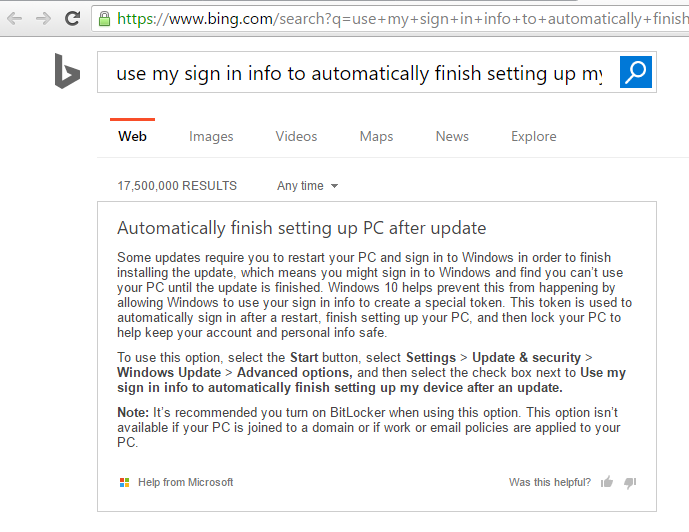
One of our favorite new features is that Microsoft is allowing you the option to automatically sign in to complete update installations. Before, as you more than likely encountered with the Anniversary Update, after you restart your machine you get welcomed to a solid color background with statements like “We’re just getting things ready” while it finishes the installation. Now in the latest update you can elect to have Microsoft automatically sign you back in to complete these types of installations.
Setting Up a New PC
 Frequently if you purchase a new machine from one of the big name manufacturers, you know that it comes pre-installed with loads of software you don’t need. If you have an IT family member or if it’s a work machine, someone usually has to completely reinstall a new version of Windows. Now with this update Microsoft is offering a tool to give your PC a “fresh start” and delete everything but your personal files. What this means is you can erase all the junk software saving you time when you set up a new machine.
This new setting is located in the same Settings Menu listed above. Start Menu > Settings > Update & Security > Recovery. If you already have software installed, be sure to know you can easily reinstall it – this is a method best for when you first purchase your computer.
Cortana Gets Even Stronger
Microsoft really has ramped up their “Digital Assistant” game in the competition against Google Now and Apple’s Siri, in their latest update. Take a look here to hear about all the updates directly from Microsoft.
From the Fuse archive, first published August 15, 2016. Read the latest on the Fuse blog.
