
Planning for On-Premise Infrastructure Deployments

With cloud computing so popular, some organizations have given up on servers at their place of business. But some still prefer to host their own IT in-house for control and security. If that’s you, there are a few things to sort out before you start buying hardware.
For a small business or startup, setting up on-premise servers can be intimidating. Understanding the basics goes a long way. Here are a few suggestions.
Get a server rack
Buying a rack right away may seem like overkill, but as your central infrastructure grows, adding machines to an orderly rack pays off. Get one that fits your needs. Racks are measured in rack units (“U”) and typically come in full height (42U) or half height (24U). Wall-mounted cabinets can also hold servers and switches.
Decide where it will go
If you’ve never had on-premise hardware, you may not have thought about where it will live. Setting it on top of a cabinet or on a shelf might seem fine, but as the business grows, the money you saved by squeezing it into spare space disappears when a tangle of wires and components has to be disconnected and rebuilt properly, with downtime along the way.
Servers are hot and loud. They’re also important and likely hold sensitive data you don’t want exposed. Your best bet is to isolate them in a closet or a dedicated server room. If you don’t have one, you can partition part of a closet or room just for your central infrastructure. That’s also when you plan your cooling.
Cooling
Cooling is one of the biggest considerations for any organization hosting its own hardware, and it’s an investment. Know what your cooling system needs to look like before you move any hardware in.
If you’re only housing a backup appliance, network-attached storage (NAS) or networking equipment, good ventilation may be enough. Once you start filling a rack, though, every machine adds heat, and heat can shorten equipment life and cause hardware failures and downtime.
Also make sure cooling runs around the clock. Many office HVAC systems shut off after people leave for the day, so server room cooling may need to be set up separately from the building’s system.
A mess of wires
Once cooling and servers are in place, you’ll keep adding hardware as the business grows, and every addition brings more cables. Without care, good intentions turn into a mess like the one on the left below.
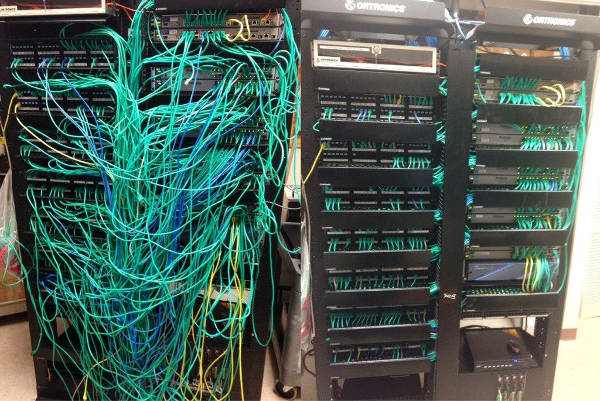
For a rack like that, the only remedy is a complete rebuild. The tidy rack on the right took a technician a full workday of sorting through the mess.
Label everything and document the entire rack, so anyone can quickly find specific hardware when something needs attention. One tip: keep a label printer with your hardware so servers and network equipment can be labeled with their names and IP addresses.
Your checklist
- Choose the right rack size. With room to grow.
- Dedicate a secure space. A closet or server room.
- Plan cooling that runs 24 hours. Separate from office HVAC.
- Label and document from day one. Names and IP addresses.
The bottom line
Hosting your own hardware gives you control over your IT, but it takes planning to avoid headaches. If you’d like help planning or organizing a server room, our Michigan team is here. Talk to our team: 248‑545‑0800.
From the Fuse archive, first published April 15, 2019. Read the latest on the Fuse blog.
