
Basic IT Security Tips

The security of your IT systems starts with your employees. Keep your company data safe with these quick, easy tips.
Detect and avoid suspicious emails
Three techniques are the most common in email scams. Avoid them, and make sure your employees know how to spot them:
- Spoofed email addresses: don’t reply to unsolicited email and don’t open its attachments. Check for misspellings and mistakes, but know they won’t always be there, so stay cautious.
- Suspicious links: hover over a link before clicking. The full address will appear, usually in the lower corner of your browser. If the destination isn’t what you expected, don’t click.
- Forged websites: for anything that needs security, like making payments or entering banking information, type the address in yourself so you aren’t sent to a fake site built to steal your information.
Ignore the popups and contact your IT provider
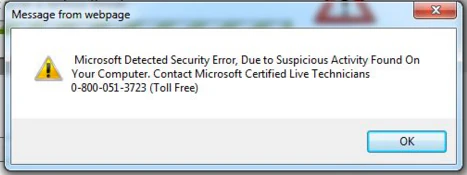
If you’ve seen a popup like this one, you may worry you’ve been infected. Don’t click on it. Clicking can activate the malicious program if it hasn’t already run. Run your antivirus and anti-malware scan, and call your IT provider, never the number shown in the popup.
Require administrative access to install software
The best way to prevent accidental malware installs is to let only administrative users install software. There are a few ways to do this. Often the most straightforward is Group Policy from a server.
Restrict personal cloud use for company files
Keep sensitive information from leaking by restricting personal cloud storage and sharing services for work. Read more in our earlier post: The Risk of Employees Using Personal Cloud Sharing Solutions.
Keep software updates and security patches current
Updates and patches close security holes that have been found and address new threats. The simplest way to avoid an easy mistake is to keep all software up to date against the latest vulnerabilities.
Run antivirus and malware protection on every machine
Antivirus adds a layer of security, and the real value shows when you think about going without it: a virus, malware or ransomware could bring down your whole network. Malicious software will likely get installed by accident at some point, so be proactive and protect your machines.
Set up anti-spam for email
Email attacks will happen, and training alone isn’t always enough given what’s at stake. There are plenty of anti-spam solutions for email. Talk with your IT provider about the best fit for your budget and needs.
Your checklist
- Teach the three email scam types. Spoofs, links, fake sites.
- Tell staff: never call a popup’s number. Call IT.
- Remove admin rights from everyday users. Use Group Policy.
- Patch, run antivirus and filter spam. On everything.
The bottom line
A few basic habits stop a lot of attacks before they start. If you’d like help putting the right security in place for your budget and needs, our Michigan team is here. Talk to our team: 248‑545‑0800.
From the Fuse archive, first published January 26, 2016. Read the latest on the Fuse blog.
